更新~~~ lenonvo 方已然承認錯誤,並於系統更新後便可移除
不放心的朋友可直接再跑一次文中的移除教學便可

各位朋友有在使用 Lenovo 的產品嗎???
不知道大家有無注意到 Lenovo 旗下的產品近期開始出現一個強制性的廣告程式
SuperFish
這個程式最原始的出發點是為了將 Lenovo 的廣告透過網路端直接發送到你的電腦上
但其實 Superfish 會在未經使用者的同意下進行以下動作
擅自在搜尋結果插入第三方廣告
攻擊破解開放的 SSL/TLS 安全連線,並提供冒充 Https 合法網站憑證等,可矇騙進而綁架連線網站
有心的駭客還能透過 Superfish 竊取銀行、醫院等隱私資料。
總的來說就是代表著你的電腦被開了後門(還是官方主動幫你開的)
更可怕的是...這個原只存在聯想電腦產品線下的程式也可被安裝到其他的 Windows 電腦上
所以到這裡一定有朋友想知道自己的電腦到底有沒有 "中標" ???
有意想查證的朋友可以到下面這個網站來進行檢測 (會跳出一個新分頁) <<< 網站已死亡
Superfish, Komodia, PrivDog vulnerability test
進入網站後等待約30秒就可以得到測試結果
如果您得到的答案不是下圖...那就是代表你的電腦中已被安裝了 Superfish

中毒了該如何解決???
對於這個機制~~~在被廣泛抗議後總算有了結果
聯想官方承認錯誤並提供了官方的解決方案給大家
(請懷疑自己電腦有中獎的朋友直接進行以下教學)
 下載 Superfish 移除工具
附註:
- 如果您是將 Firefox 或 Thunderbird 安裝在多使用者系統上,則必須執行此最新版本。
- 即使工具成功移除了 Superfish,某些防毒或反惡意程式碼應用程式仍會回報 Superfish 問題。如果發生這種情況,請聯絡您的應用程式供應商。
- 某些防毒或反惡意程式碼應用程式將修改 Superfish 安裝,因而使得此工具將無法順利完成。如果發生這種情況,請聯絡您的防毒或反惡意程式碼應用程式供應商。.
版本:1.0.7.0
更新:
- 新增語言支援
- 針對 Firefox 和 Thunderbird 的憑證移除,提供多使用者支援
- 處理 Superfish 的解除安裝程式已遭移除的情況
手動解除Superfish應用程式 從Windows憑證資料庫中手動移除Superfish 憑證(包含:IE瀏灠器, Chrome, Opera, Safari, Maxthon) 從Mozilla軟體中手動移除Superfish憑證(包含: Mozilla Firefox, Mozilla Thunderbird)
A. Superfihs應用程式已被解除安裝
B. Superfish憑證已被移除
請按照以下的說明,確保Superfish軟體皆以完整解除
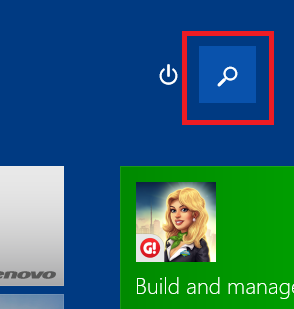
步驟 1: 在 Windows 8.1, 上點選"搜尋"功能
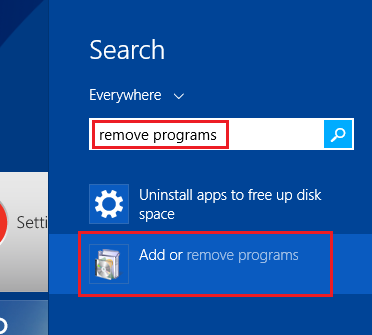
步驟 2: 搜尋"移除程式",選擇"新增或移除程式"
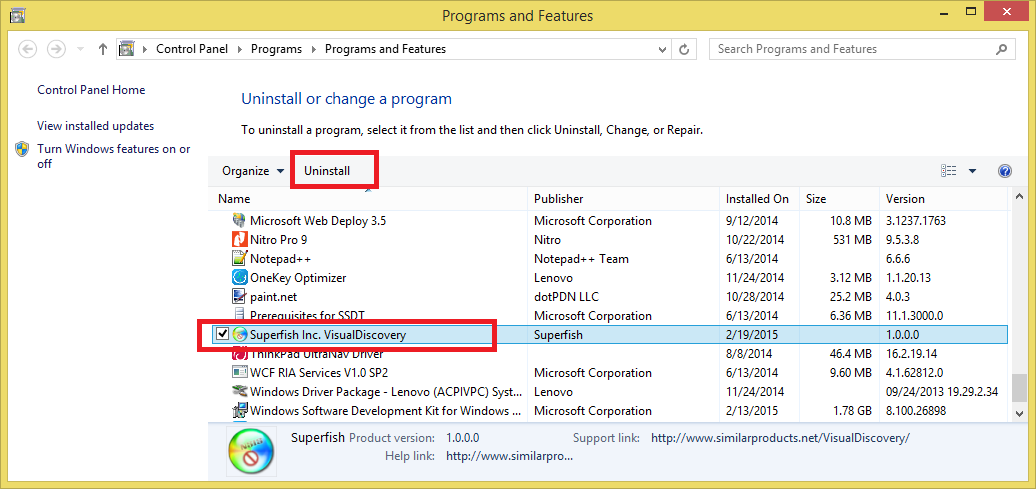
步驟 3. 在已安裝的程式清單中,找到"Superfish Visual Discovery"
注意: 如果您在已安裝應用程式清單中找不到"Superfish Visual Discovery",您可能是沒有安裝Superfish軟體。建議您依照 B)確認您是否有安裝Superfish憑證以及如何移除繼續進行
步驟 4:選擇"解除安裝".解除安裝程式需要一些時間.當解除安成後,它會自動從已安裝應用程式清單中刪除.
步驟 5: 確認解除安裝程式完成後,請繼續依照"如何移除Superfish憑證"
在完成解除Superfish軟體後,Superfish憑證可能仍然存在.刪除superfish憑證是非常重要的步驟,即便軟體已被解除安裝
注意: 依據以下說明,這些瀏覽器將會移除相關的Superfish憑證
- IE 瀏覽器
- Google Chrome
- Opera
- Safari
- Maxthon
- 以及任何存在於Windows憑證資料庫中的瀏覽器
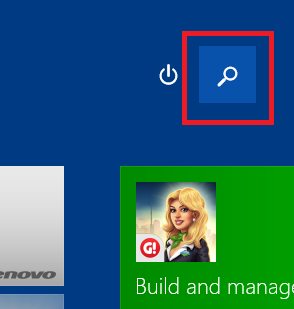
步驟 1: 在 Windows 8.1, 上點選"搜尋"功能
步驟 2: 搜尋"憑證",選擇"憑證管理員"
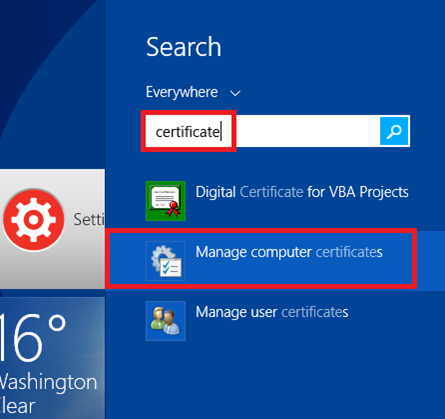
步驟 3: 當Windows 提示,"你允許這個程式繼續進行並更改這台電腦的設定值?" 請選擇"是"
步驟 4: 顯示憑證管理員視窗,請在視窗左側,展開"Trusted Root Certifcate Authorities",點選子資料夾"Certificates".在視窗右側,請找到"Superfish, Inc."的項目
注意: 如果您找不到"Superfish, Inc."這個項目,代表此憑證不存在於Windows資料庫中.假如您有安裝Mozilla Firefox或Mozilla Thunderbird,請參閱下一個步驟"如果您有安裝Firefox 瀏覽器或Thunderbird信箱軟體,請依據以下說明各別執行".
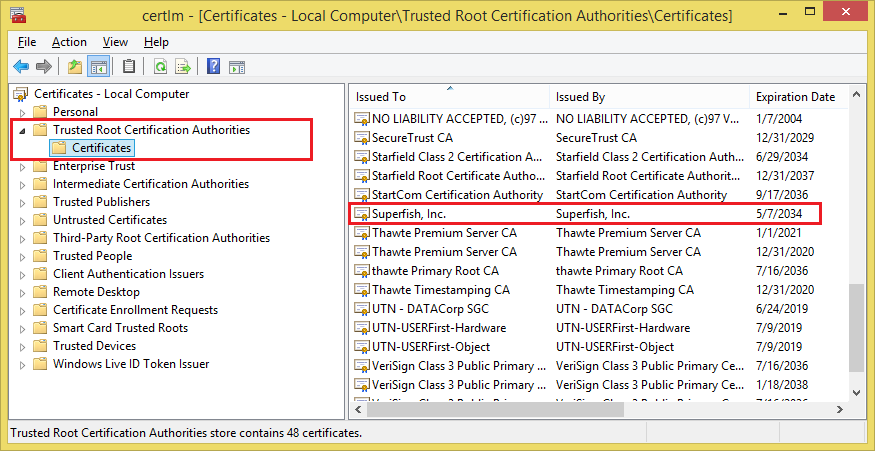
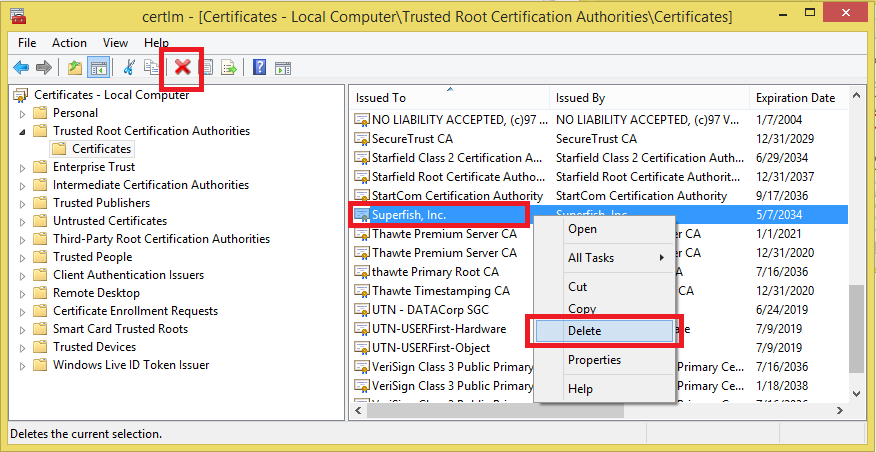
步驟 5. 在"Superfish, Inc."上按下滑鼠右鍵,並選擇"刪除"功能或者點選視窗上方工具列中標示紅色"X".
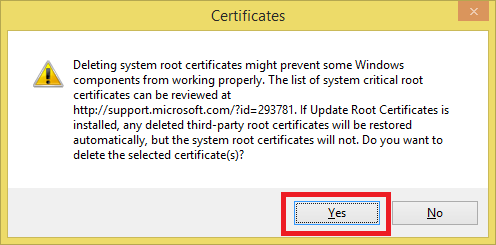
步驟 6. 當Windwos 提示出現確定刪除的視窗訊息時,請選擇"是".確定移除此憑證.
步驟 7: 重新啟動您的電腦
步驟 1. 開啟Firefox瀏覽器並點選橘色的Firefox按鈕

或者"選單"按鈕
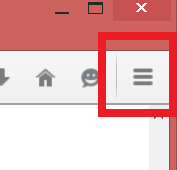
步驟 2. 選擇"選項"
步驟 3. 選擇"進階"
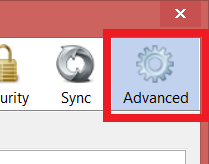
步驟 4. 選取"憑證",按下"檢視憑證清單"
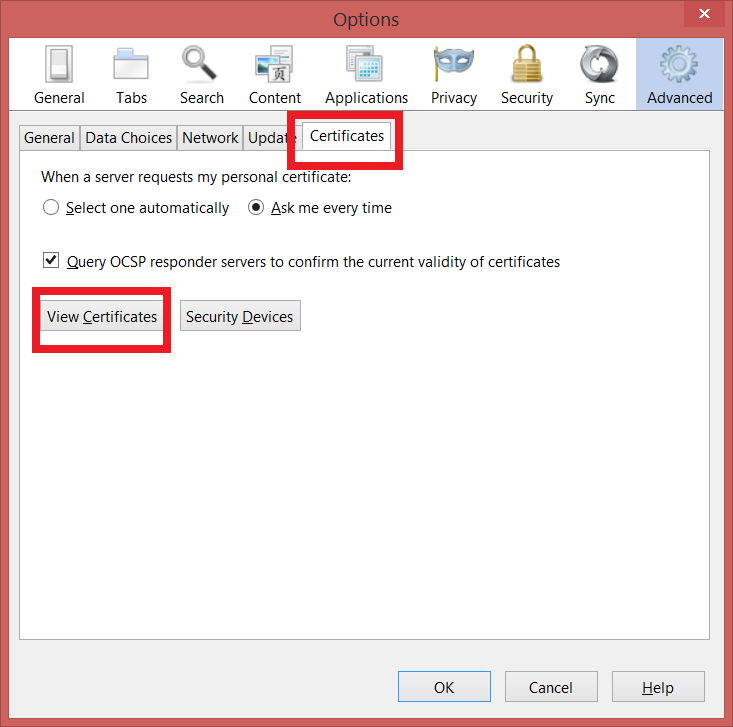
步驟 5. 開啟憑證管理員,選擇"憑證機構",並找到"Superfish, Inc."憑證後,按下"刪除或取消信任"
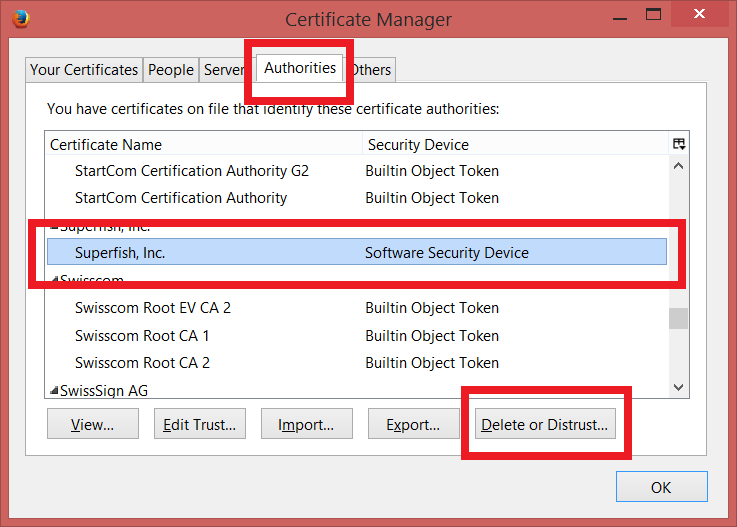
步驟 6. 在刪除或取消信任憑證視窗中,選取"Superfish, Inc."後,按下"OK"鍵以確保刪除這個憑證

步驟 7. 重新啟動電腦
提醒: 如果您同時有 Thunderbird 和 Firefox,您將必須為每個應用程式重複這些步驟。如果您擁有多使用者系統,您將必須為每位使用者重複 FireFox 和 Thunderbird 的移除程序。
注意: 在執行這個步驟後,"自動解除安裝工具"將會協助移除相關程式的文件或註冊檔.
Google 免費字型 Noto Font 開放下載 & 字型安裝 教學
趨勢 Trend OfficeScan 佔用過多CPU資源時的救急方法
想更快追蹤到更多的更新請加入傻瓜狐狸的粉絲團
(同時請您參考如何確實的看到所有粉絲團的更新)
原文發表於傻瓜狐狸的雜碎物品


請先 登入 以發表留言。